|
|
 |
|
Nav-Bar |
Getting Java Working |


|
People always seem to have problems running Java. For me,
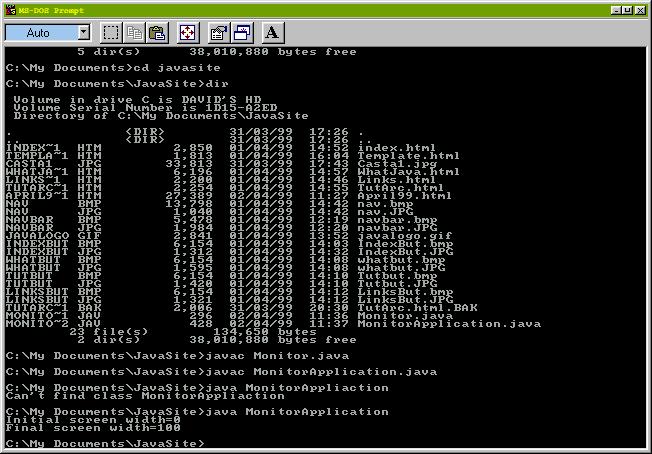
I just clicked the install button and it works - but as I got a few requests,
here's the guide to running Java.
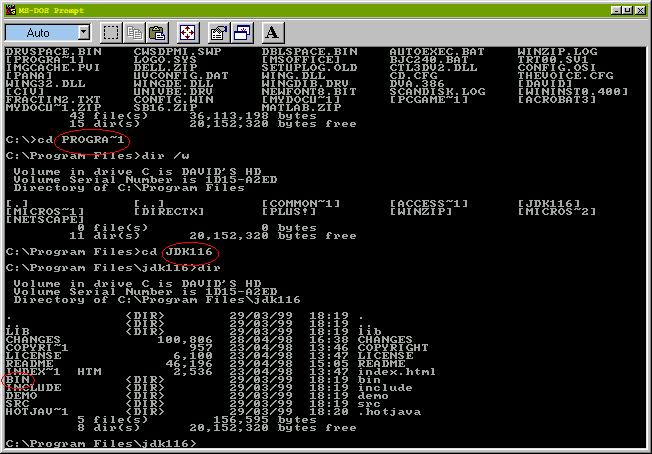
There are a few places this procedure doesn't work. For example, you might get an error message "Unknown command or file name" indicating that the "javac" command can't be found. This will be due to the command not being in the command path. To get it working, at the MS-DOS prompt type: PATH = [full path of where the "javac" command is] The command is usually in the "BIN" drawer of your Java installation. Once you've located this you need the full MS-DOS path.
Here the full MS-DOS path is "C:\PROGRA~1\JDK116\BIN" So at the MS-DOS prompt you would type PATH = C:\PROGRA~1\JDK116\BIN Now all of the command to run Java such as "javac" and "java" can be found. It is probably worthwhile adding this "path" line to your Autoexec.bat file so it is executed every time you boot up your computer. The documents that come with Java explain all this fully though, so you should read these if you have any problems. |